



Welcome to windows-noob.com!
Logging in will allow you to download scripts used in the guides.
If you came here looking for the Endpoint Manager step-by-step guides then please start here.
Register for free and ask your questions in our forums.
- 23 replies
- 19144 views
- Add Reply
- 0 replies
- 1763 views
- Add Reply
- 13 replies
- 8735 views
- Add Reply
- 0 replies
- 2103 views
- Add Reply
- 0 replies
- 3168 views
- Add Reply
- 2 replies
- 3956 views
- Add Reply
- 0 replies
- 3969 views
- Add Reply
- 0 replies
- 3773 views
- Add Reply
MBAM portals cannot access

By hannah,
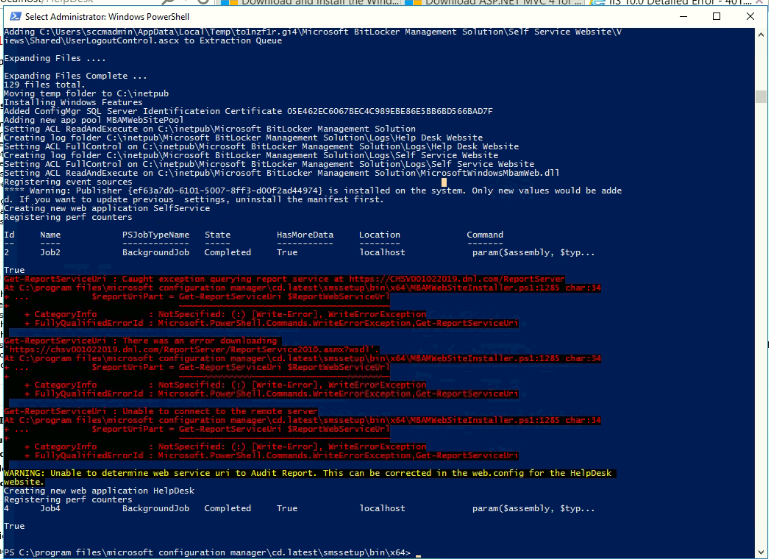
I run the script for creating a BitLocker portals. , I tried to access the portal but cannot connect it keeps prompting for the credential.
After moving the Primary Site (including SUP) to another server Office 365 Updates can't be downloaded

By FSiglmueller,
Hi All,
after moving the Primary Site (including the SUP) to another server, I am not able to download any Office 365 update.
I will get the following error message: "Failed to download content id <ID>. Error: Invalid certificate signature".
My WSUS Certificate of the new server (Self-Signed) is placed here:
- trusted publishers
- trusted root certificate authorities
Any help is appreciated.
Thanks in advance.
After changing the SQL Server the MECM integrated Bitlocker won't show any recovery key in the Helpdesk Portal
By FSiglmueller,
Hi All !
I have migrated my SQL DB to another Server.
After that move the MECM Bitlocker Helpdesk Portal (Webportal) shows no recovery key for any system.
When I have a look to the database, there are all entries inside (encrypted). How can I go on to get it working with the helpdesk Portal ?
I urgently need the keys, because at the moment I am not able to solve any bitlocker issues for my systems.
The whole MECM environment is in HTTPS mode only (if this is helpful).
Any hel
How to create alert when software update installation fails?

By phenomenon,
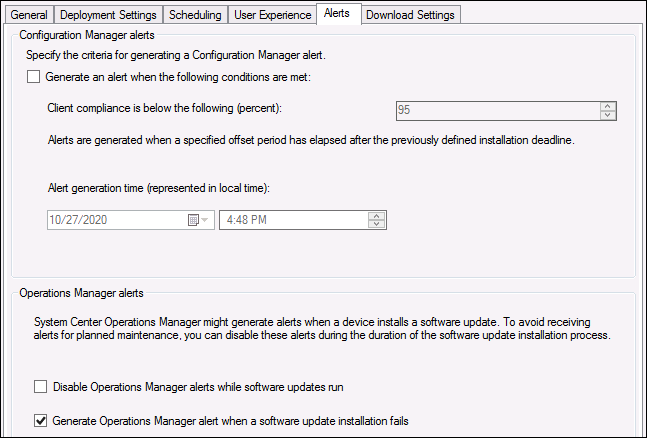
I'd like to get a email when a software update installation fails so I don't have to go to deployments and look for it manually.
The existing option for an alert when client compliance falls below a percentage is useless for us, and we don't use SCOM.
A report would be OK too as long as I can somehow automate it and have it emailed to me.
All clients are shown as offline (gray icon). In bgbserver.log: SMS_NOTIFICATION_SERVER errors for ssl and sql

By psyapathy,
Hi! ?
Recently I made settings for PXE and sccm site configuration (https communication clients), these edits did not help and I returned everything back. But from that moment on, all clients turned gray and errors appeared in the logs:
: 1. ERROR: can't retrieve SQL connection. Exception: System.Data.SqlClient.SqlException (0x80131904): A connection was successfully established with the server, but then an error occurred during the login process. (provider: SSL Provider, error: 0 - Th
ADR not downloading updates

By kesh,
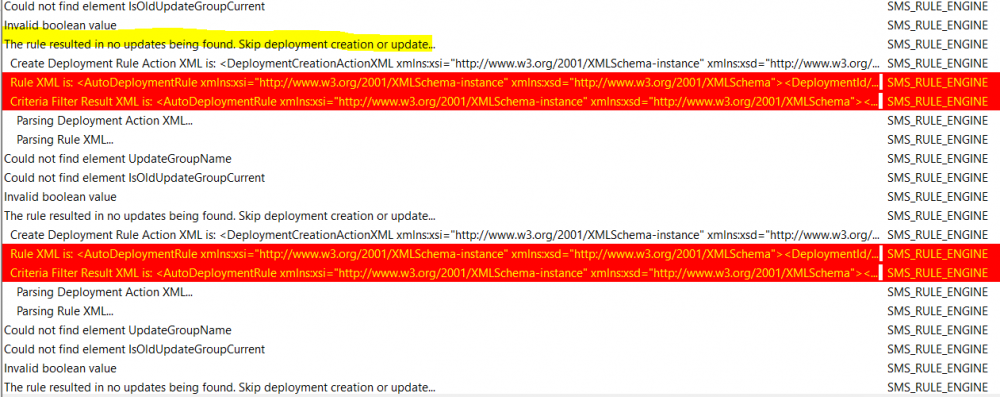
Has anybody experience this issue with patches not downloading. I am having this problem for October? My ADR is running with no errors, but no updates are being downloaded. Last month's ADR and downloads
went off without a hitch
Rule Engine Error
ADR - no problems
ADR settings
No patches under Preview
SCCM - O365 client update not installing

By 403AccessDenied,
Hi all,Thanks for any help in advance.I am new enough to SCCM and working on Office 365 client updates through ADR. On my test bed currently is O365 v1705 (Build 8201.2294), I am pushing client update v1808 (10730.20438) to it.ADR, Deployment Packages and Software Update Groups are setup and working.The Office 365 update does appear in the Software Center for installation, for testing I have everything set to the most visibility. When selected to install, the process goes through the download an
ADR is failing with 0X87D20003 SQl Error

By ogeccut,
I have an ADR that failed with 0X87D20003 SQl Error.
I have found this site that has the same error, and its related to a deleted collection or missing collection.
https://sccmnotes.wordpress.com/2019/07/10/automatic-deployment-rule-failing-with-error-0x87d20003/comment-page-1/
I am trying to run a query to identify a missing collection, but getting an error:
declare @ADRName varchar (200) = 'Workstation Updates ADR'
select
Data.value('(/DeploymentCreationActionXML//Collect