



anyweb
-
Posts
9292 -
Joined
-
Last visited
-
Days Won
371
Everything posted by anyweb
-
 yes, see my blog post here > How can I dynamically install language packs and features on demand in an offline environment for Windows 10
 -
did you restart the server ? did you review the docs here ? https://docs.microsoft.com/en-us/mem/configmgr/core/servers/deploy/configure/about-the-service-connection-point
-
good job, did reviewing the logs help ?
-
look at your scanstate and loadstate logs, do they reveal the cause ?
-
Clients not getting self singed certs
anyweb replied to TeachMeSCCM's topic in Configuration Manager 2012
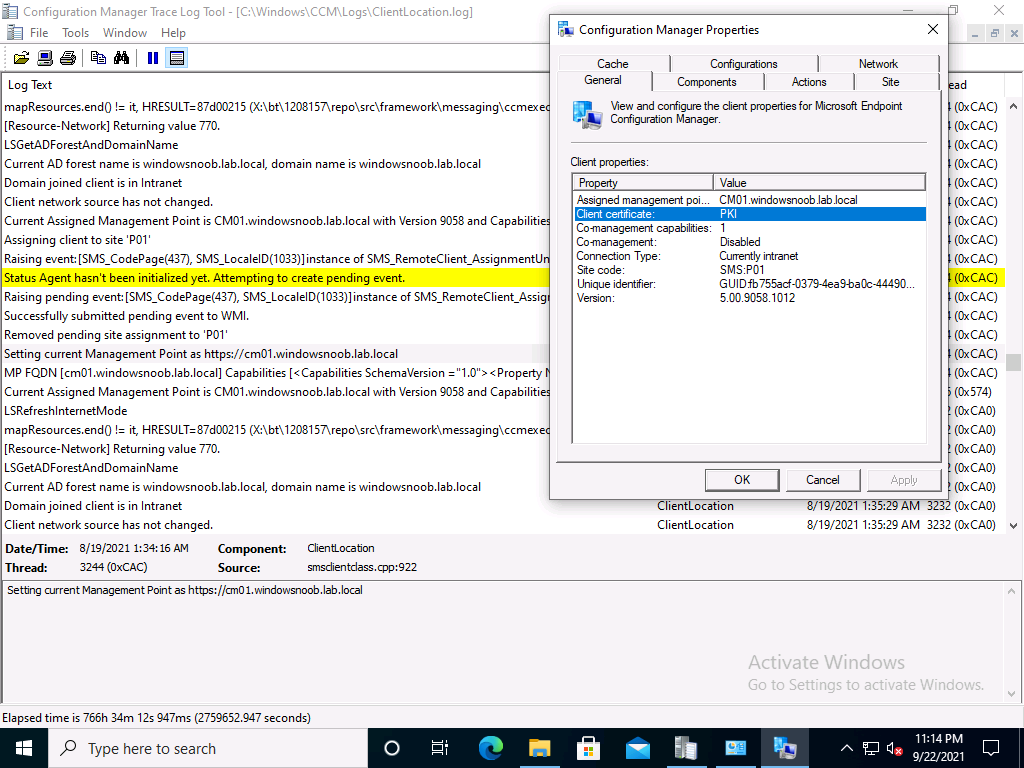
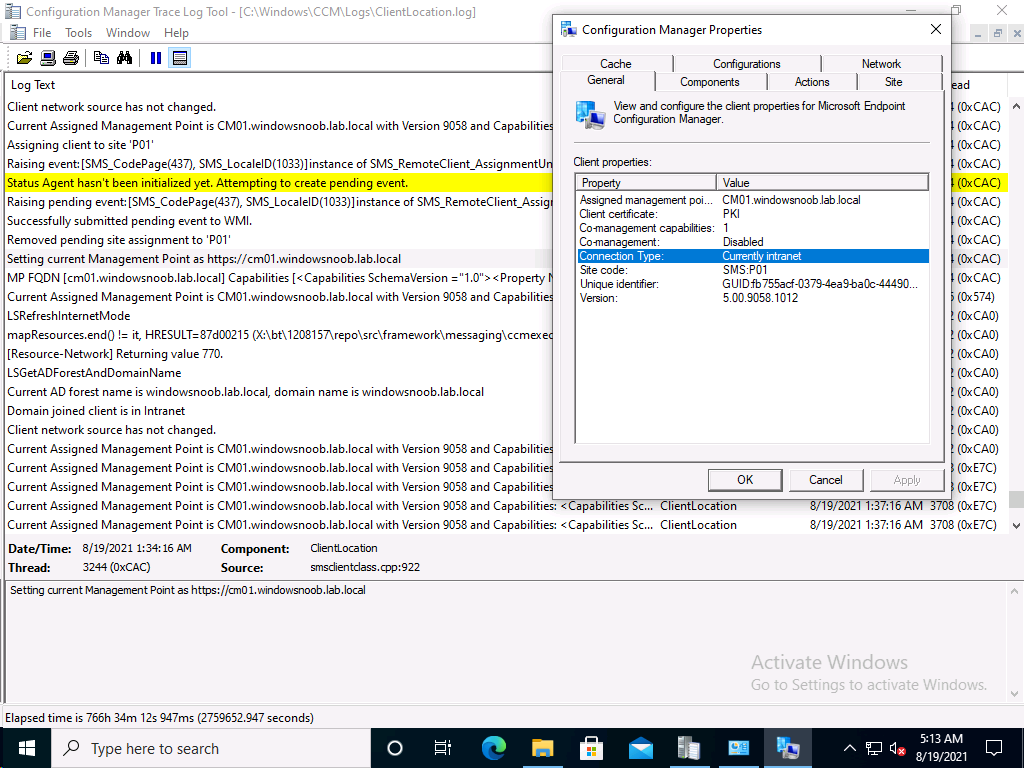
take a look at my two posts here, they cover everything you need to convert to https, they'll cover a bit more than Justins excellent video, so do please verify you didn't miss anything How can I configure System Center Configuration Manager in HTTPS mode (PKI) - Part 1 How can I configure System Center Configuration Manager in HTTPS mode (PKI) - Part 2 also, keep in mind that certs can expire, and when they do you'll have issues, like this https://www.niallbrady.com/2020/08/16/how-can-i-replace-an-expired-iis-certificate-in-a-pki-enabled-configmgr-environment/ if you want to really test PKI is working then try pxe boot (operating system deployment), if it fails you'll see it failing quickly in the logs, and that'll be a clue that you've missed something, also, on PKI managed clients, your configmgr client agent should report that the client is PKI, like this...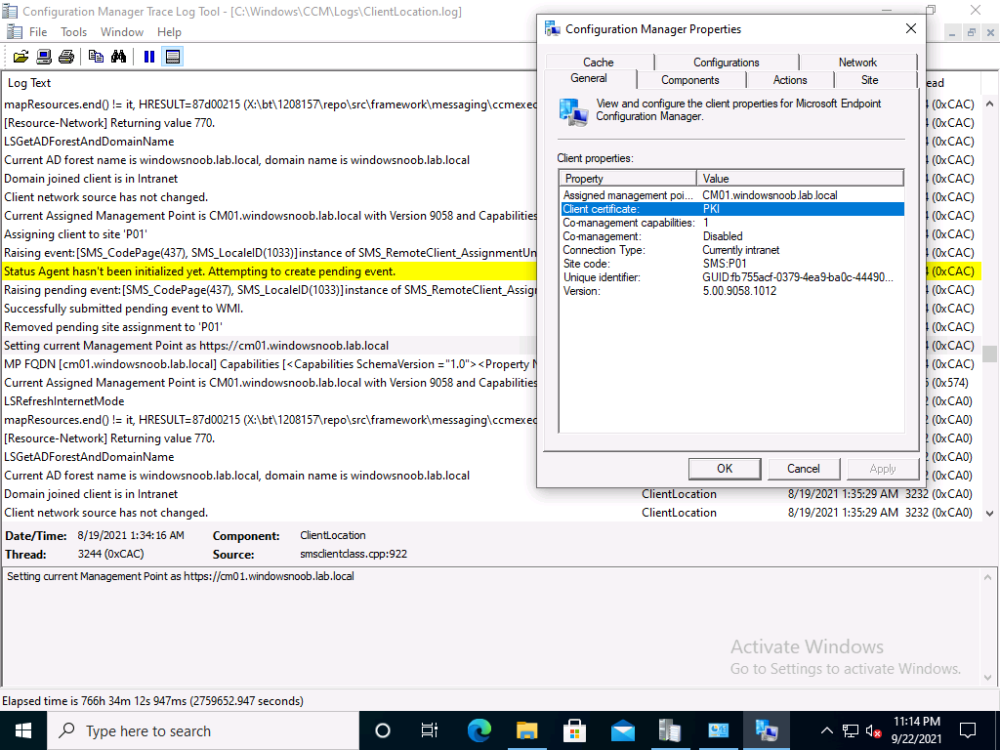
-
Sccm pxe boot failed
anyweb replied to Rafiq's topic in System Center Configuration Manager (Current Branch)
ok, then when you see that screen press f8 to bring up the command prompt before it reboots, then locate the x:\windows\temp\smstslog\smsts.log file and attach it here -
Sccm pxe boot failed
anyweb replied to Rafiq's topic in System Center Configuration Manager (Current Branch)
are you pressing F12 when prompted ? -
MBAM portals cannot access
anyweb replied to hannah's topic in System Center Configuration Manager (Current Branch)
have you seen -
Clients not getting self singed certs
anyweb replied to TeachMeSCCM's topic in Configuration Manager 2012
let's just focus on one problem at a time, your e-http setup, did you configure it like i said ? and are your roles all configured in http only or ? -
Clients not getting self singed certs
anyweb replied to TeachMeSCCM's topic in Configuration Manager 2012
try setting it like this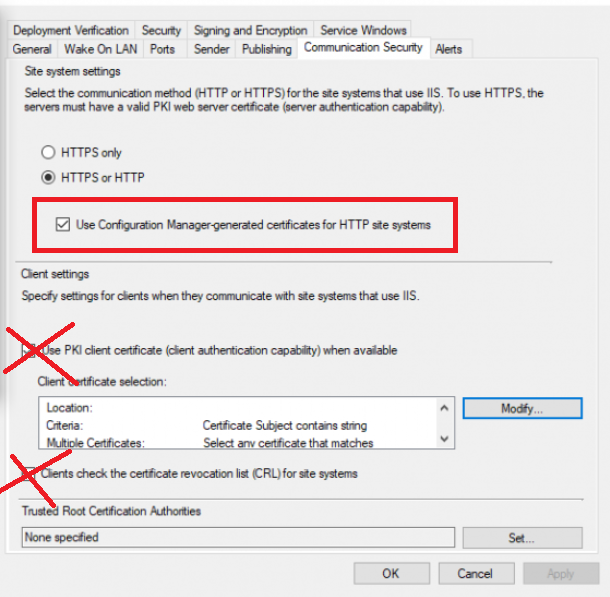
-
Clients not getting self singed certs
anyweb replied to TeachMeSCCM's topic in Configuration Manager 2012
it's a bit unclear from your post but what is your actual goal here, are you trying to enable ConfigMgr in HTTPS mode (PKI) or are you trying to use e-http (enhanced http), or do you simply have client issues with invalid sms certs ? -
hi there, all the scripts are freely downloadable as long as you are a logged on member of windows-noob.com, which you now are, so please try again @Champ
-
and what does it report when you evaluate the compliance of that configuration ?
-
good info, can you show me your Configurations tab in the configmgr client agent...
-
show me screenshots of your configured settings, something is not right
-
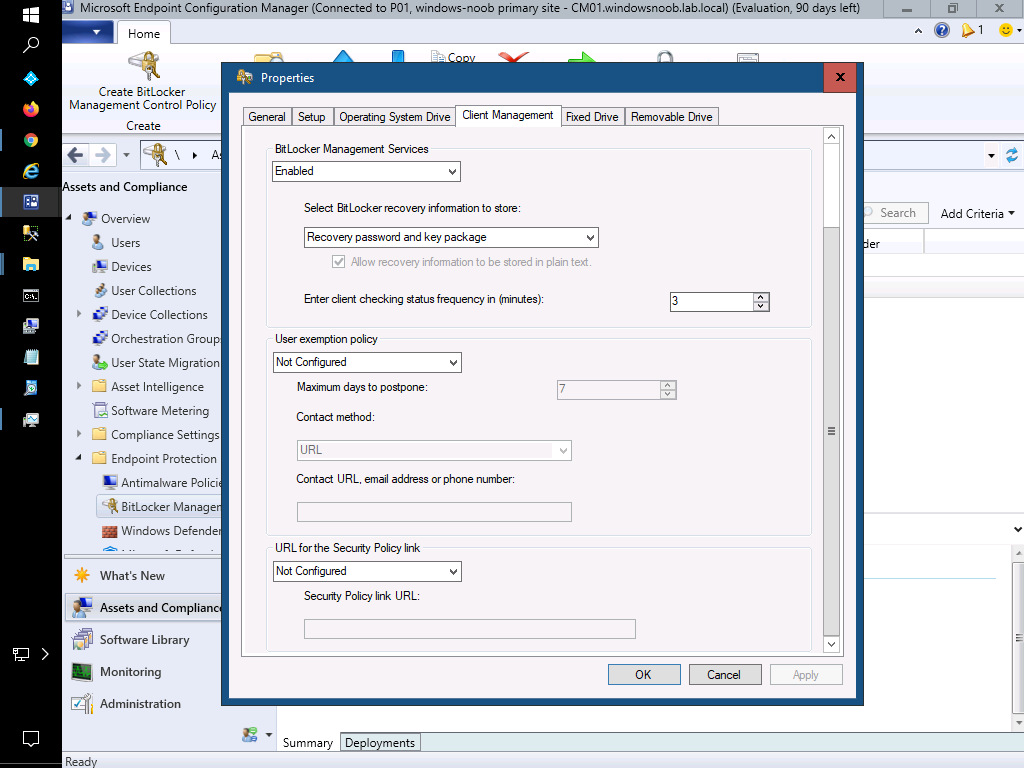
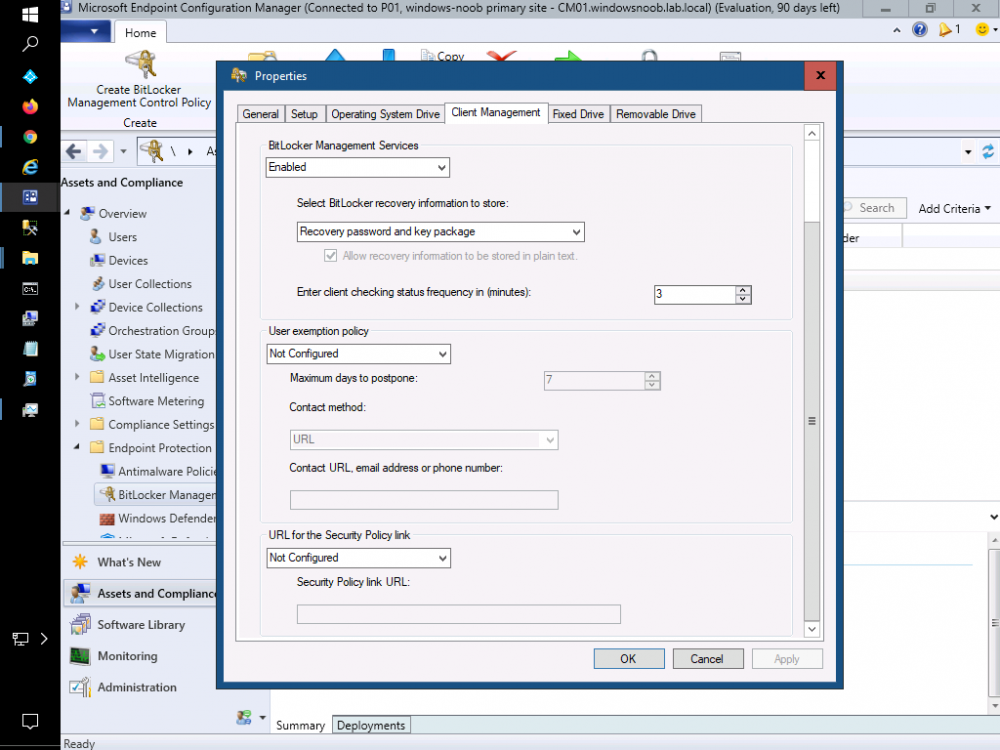
ok if the mbam client is not getting installed then there's something wrong with your policy settings, are you sure you've configured Client Management and set it to Enabled ?
-
i mean, do the client versions correspond to the site version, if yes then let's figure out if the client is getting the policy or not, did you check on the configmgr client agent to see if the bitlocker policy you configured is listed ?
-
are your clients updated with the latest configmgr client agent ?
-
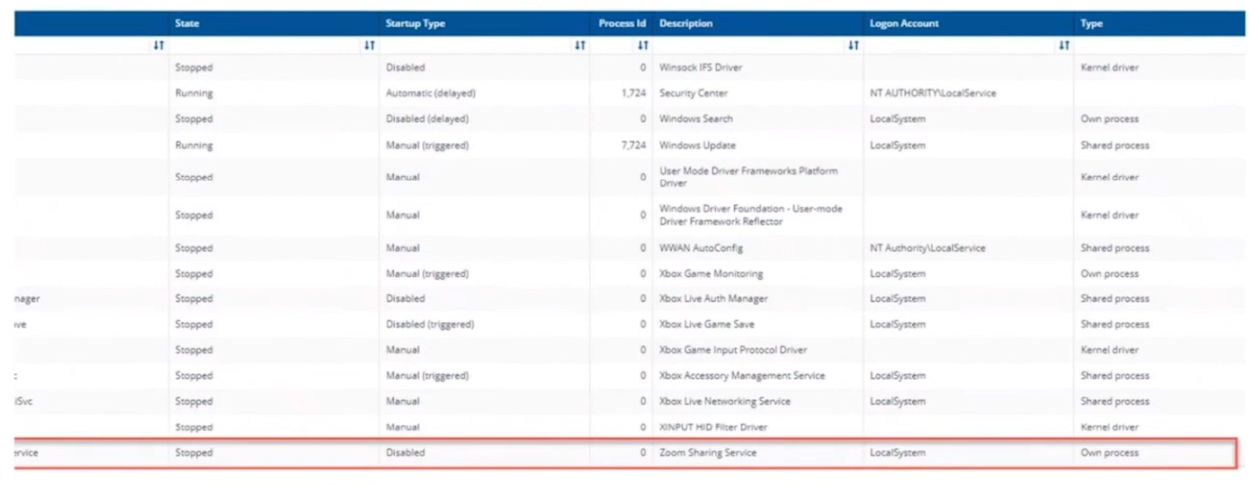
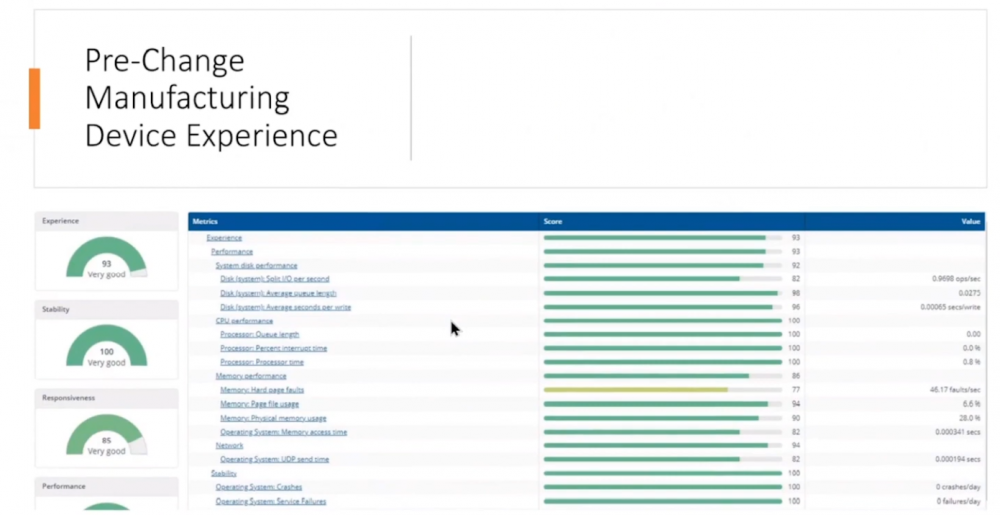
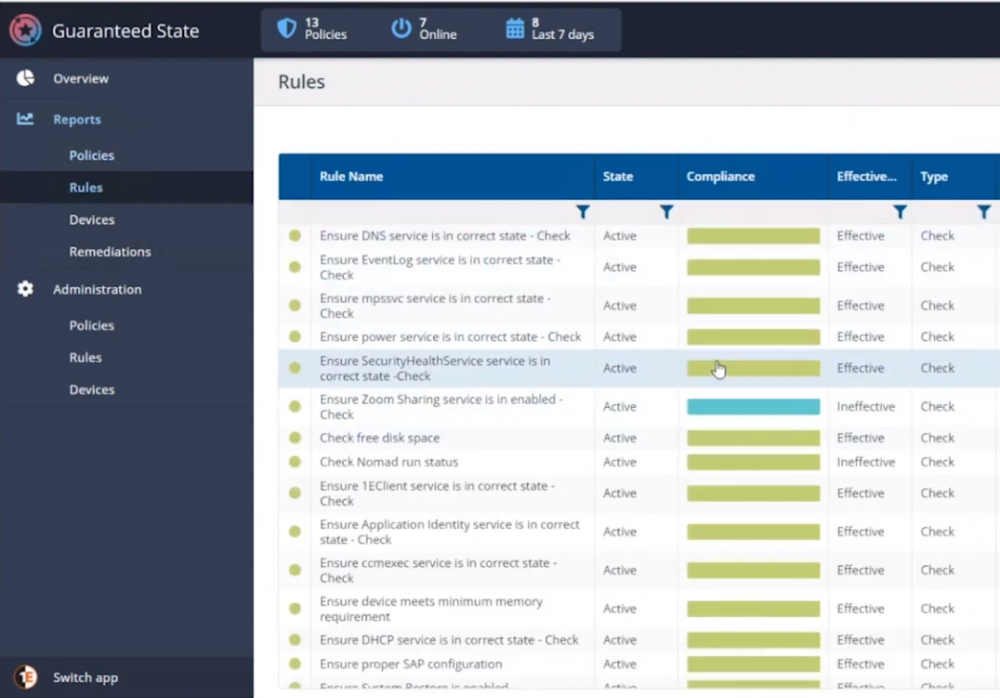
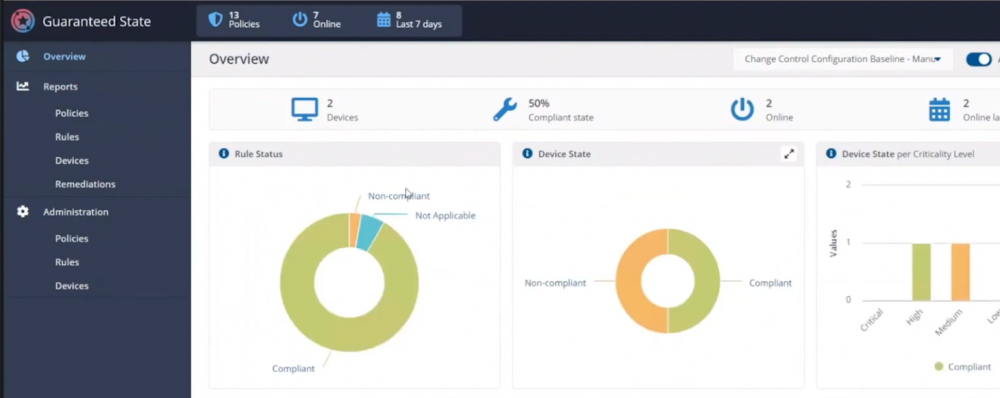
Introduction If you haven’t already noticed I’m currently blogging about a series of DEM in 20 webinars from 1E and I’ve linked each one that I’ve covered below for your perusal. In today’s blog post I’ll focus on how to deal with that Change Management Success Rate Struggle. That’s a mouthful, but in a nutshell what it means is how can you cope with the onslaught of issues raised both pre and post change for a change management request. Every company has to deal with change management, possibly even more so now with so many people still working from home. Not only will you learn how to deal with the change management success rate, but get real time data before and after the change. Episode 1. How to find and fix Slow Endpoints Episode 2. That crashy app Episode 3. Dealing with annoying admin requests Episode 4. That Change Management Success Rate Struggle Why is change control important ? Help Desk International (HDI) referenced that 80% of incidents are caused by internal change. That’s a huge percentage. “80% of incidents are caused by internal change” If we could just control that better and get an idea of what the output would be like before we roll it out into production then we’d have less incidents and more time to do the job we we’re hired to do. Change Control Requests Change control usually starts with a change control request form for the desired change, in this example it’s for a global Zoom upgrade. Zoom is telecommunication software for holding meetings, and it became hugely popular during the ongoing Covid pandemic due to so many workers having to work from home. As new features are added, or security patches released, new versions need to be pushed out, and that all starts with a change control request. In Robs’ line of business (Rob Key, Senior Solutions Engineer at 1E), and some of the customers he talks to, it’s common to see them using the following methods for change control, either by sending the change to IT so they can test it on one or more machines, and then after doing that test, sending out a survey to the users involved asking how did that affect your machine, but depending on that change, IT might not dig in as deep as we’d like or using an UAT (user acceptance testing) group to look at it. Capturing pre-change data Let’s take a different approach using Tachyon Experience. Not only can we do monitoring but we can check health and compliance policies on a group of test machines to make sure that we can see that those machines stay healthy both before and after the change is completed. For that we’d want to capture pre-change health and compliance information. In this particular example there are two control groups, manufacturing and marketing. These are two different parts of the organization and they have different needs, so they should be good target groups for the data that we need. In the screenshot below we can dig down and see that services are healthy and all of the numbers are looking good. Next we can verify the version (in real-time) of the target software we intend to change, and below we can see it’s not yet upgraded. We can also see the services running, or in the example below, that a Zoom sharing Service is both stopped and disabled. It was disabled as a policy was created to not allow that service to run in the manufacturing group, for security reasons, to stop the release of important and confidential information. For the marketing group another policy was created to allow it to run. Post-change rules to guarantee state Any area of a business that goes down due to change management processes that go wrong costs that business money, so to avoid that, policies are created in Tachyon in Guaranteed State. You can see two policies in the drop down menu below, one for marketing, and one for the manufacturing group. Here’s a closeup of those policies. These policies are created using one or more rules in Tachyon Guaranteed State. This is post-change, and here we can see a rule from our policy targeting the marketing department, pay attention to the Not Applicable slice. Clicking on that reveals the following, and here we can see that there is a check to ensure that the Zoom sharing service is enabled, however this new version of Zoom doesn’t use this as Zoom changed the way they structure their software. So how were these Guaranteed State policies created? Each rule can check for various things, such as checking for free disk space or whether or not the Zoom Sharing Service is enabled or that the 1E Client service is in a correct state. Below you can see a list of some of those rules. If we take a closer look at a rule, in this case a rule to Ensure the DNS service is in a correct state, you can see from the screenshot below that the rule looks at optional Pre-conditions, Triggers, the Check itself and an optional Fix. What about non-compliance post-change ? Seeing real-time results that reveal non-compliance post-change is a great ability. That can be revealed by our Guaranteed State policies. To test this, killing a service which is checked for (one of the rules above) reveals this in real-time. Below a service is stopped… and reviewing the rules results, you can straight away see that there is non-compliance and drill down to find out more information. This is instantaneous, which means you can see how to control the change management process with ease by gathering data and responding effectively. “So how quick is quick ?” This really depends on what you are looking at, for example disk space might be polled every minute or 30 seconds. But when you are talking about registry changes or config file changes or services, that is real-time. Conclusion Change happens all the time in business and while most companies have their own change management processes to deal with that change, they are very likely contributing to their own workloads by the way they do it. Remember, internal changes that are not correctly monitored pre and post change can cause major problems. Using Tachyon Experience and Tachyon Guaranteed State gives your admins the power to see those results in real-time and allows them to easily tweak the change management process to increase their success rate. DISCLAIMER: The contents of this article are the opinion of the author and have been written from an impartial standpoint; however, 1E may have reimbursed the author for time and expenses for undertaking the findings and conclusions detailed in the article.





-
CMG boundaries and Fallback
anyweb replied to Tommy75's topic in System Center Configuration Manager (Current Branch)
over time it will switch MP, now whether it'll do that during the task sequence I don't know, you want to save time so.. my point with the variable, is why not set the variable after the reboot to the CMG MP, have you tried that ? -
CMG boundaries and Fallback
anyweb replied to Tommy75's topic in System Center Configuration Manager (Current Branch)
you should be able to see from the client based logs which MP it's currently attached to and when it switches...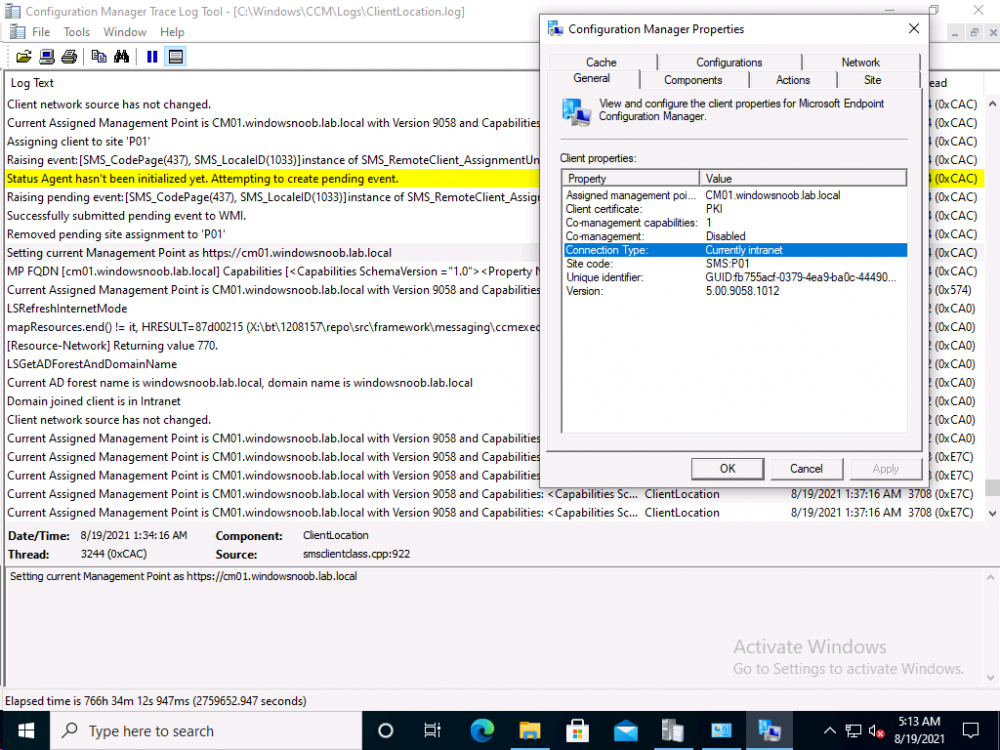
-
CMG boundaries and Fallback
anyweb replied to Tommy75's topic in System Center Configuration Manager (Current Branch)
interesting problem, are you setting this variable to true as a matter of interest ? SMSTSDisableStatusRetry In disconnected scenarios, the task sequence engine repeatedly tries to send status messages to the management point. This behavior in this scenario causes delays in task sequence processing. Set this variable to true and the task sequence engine doesn't attempt to send status messages after the first message fails to send. This first attempt includes multiple retries. When the task sequence restarts, the value of this variable persists. However, the task sequence tries sending an initial status message. This first attempt includes multiple retries. If successful, the task sequence continues sending status regardless of the value of this variable. If status fails to send, the task sequence uses the value of this variable. and have you tried setting this variable after the reboot ? SMSTSMP Use this variable to specify the URL or IP address of the Configuration Manager management point. https://docs.microsoft.com/en-us/mem/configmgr/osd/understand/task-sequence-variables -
recovery partitions are needed by the OS to recover the os in case of boot failure, you do need them, chances are your disk 0 is the system, boot disk and disk 1 is data or something else you need to make disk 1 your system disk and then you'll be able to remove the partitions on disk 0.... like so... diskpart sel disk 0 clean exit then recreate whatever partition you want on it in
-
are you absolutely sure you've configured it as we've explained ? to find out if the firewall is causing you issues, as a test, temporarily disable it, try adding the CMG connection point role again, any difference ? don't forget to re-enable the firewall after the test. If there's no change, then it's not your firewall or blocked ports but more than likely a mis-configuration or certifcate issue
-
It’s that time of the year again: SysAdmin Day has arrived, and with it comes infinite gratitude for the men and women who support us 24/7. For all the times you’ve prevented catastrophes and saved our skins, for all the long hours and patience, Hornetsecurity want to say thank you! If you’re a Microsoft 365 administrator, celebrate with them. All you have to do is sign up for free to 365 Threat Monitor and set up your account! How does it work? - Sign up to 365 Threat Monitor - Receive a guaranteed $20 Amazon voucher and a chance to win one of the Grand Prizes! What are you waiting for? Get your free 365 Threat Monitor App & Win!