



anyweb
-
Posts
9292 -
Joined
-
Last visited
-
Days Won
371
Everything posted by anyweb
-
copy the contents of the Windows 7 DVD or ISO to your share, the share in my example was \sources\os.... it's not a directory structure on the DVD itself, but a share on the ConfigMgr server
-

Need constant mouse movement
anyweb replied to reem01's question in Windows Deployment Services (WDS)
sounds weird, can you describe your imaging process please in details, hopefully Greg (from Dell) can chime in -
are you saying that your WDS server is not on the domain ? and that you want the domain client pc's to boot to it ?
-
select the third option instead of the first, does it work then ?
-
did the psp role complete correctly ? you can verify via the pxesetup.log on the configmgr server
-
hi rudi, can you confirm if the advertisement properties of the your task sequence are set to run from dp or access content directly ?
-
sccm 2007 client not updating OU location, last logged on user etc.
anyweb replied to peanican's question in How do I ?
what discovery methods have you configured ? -
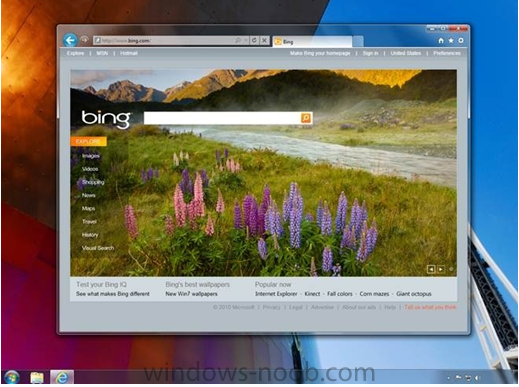
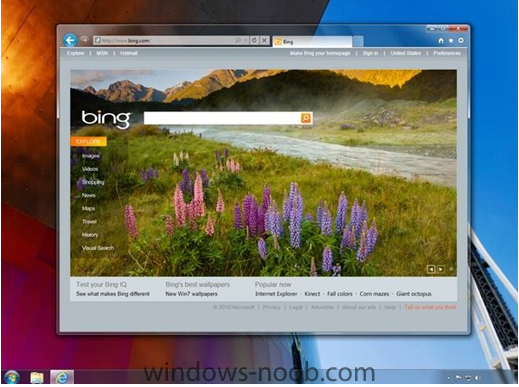
Summary: "Microsoft Russia’s press site, on August 25, posted information and a photo that seem to be connected to the coming IE 9 beta. (The site has since pulled their post, but I grabbed the information and screen shot in the nick of time.)" Microsoft has delivered four developer previews of Internet Explorer (IE) 9 so far, but has yet to show off the new interface for its next-generation browser. That is expected to happen on September 15, during Microsoft’s beta launch event in San Francisco. But maybe users won’t have to wait until then to get a glimpse of what’s coming. Microsoft Russia’s press site, on August 25, posted information and a photo that seem to be connected to the coming IE 9 beta. (The site has since pulled their post, but I grabbed the information and screen shot in the nick of time.) The screen shot (above) shows a navigation bar and fewer controls. There’s a back button, a combined URL - search box at the top. And that’s pretty much it. I don’t see menu items like “Favorites” or “Suggested Sites” or “Get More Add-Ons” (but maybe they’re still in there, somehow). I ran the text of the Russian site’s IE 9 posting through the Bing Translator. Other than turning a couple of the references from IE 9 to IE 8 (and IE 7, in one case), Bing did a good job. The Microsoft Russia site said there will be a new, simplified navigation bar with IE 9 that will leave “more room for the (Web) site itself.” There will be some navigation tools for commonly used functions — things like a back button and a combined address/search bar. But the numerous menu items in older versions of IE have “been consolidated into one,” the site said. “Now the user sees only what you need to navigate.” The Russian Microsoft site said that there will be provisions for “recognized,” or “protected,” sites which will allow users to go straight from the Windows taskbar to these sites without having to open IE first. In other words, recognized, protected sites will be treated more like traditional Windows applications. Bing translated the instructions for doing this as “©lick the pins in the address bar or click the site in a new tab and drag it to the taskbar. That’s all. If the site is pinned, it displays an icon that is separate from the Internet Explorer. Now from the website you are just one click.” (It sounds like this might be a feature accessible by Windows 7 users only, though I am not sure.) The Russian site also mentioned “tear-off tabs” — a capability that will build on Windows’s Aero Snap feature. Snap allows users to more easily look at two pages, side-by-side by “snapping” them to the sides of their PC screen. Firefox and Safari both already include tear-off tabs, allowing users to select tabbed items and turn them into separate windows. Here’s the description of the tear-off tabs from the Russian site, as translated by Bing: “Often a task must open several Web pages or screens. Advanced tabs in combination with Windows Aero Snap is a quick way to display two or two-page spread. To do this, simply drag the page in different screen and will appear next to each other. Reproduction of content sites and video are not violated.” I’ve asked Microsoft for comment on the information posted and removed from the Microsoft Russia site. I will add any comments I get to this post. Update: Not very useful, but here’s the official statement, from a Microsoft spokesperson: “Microsoft is encouraged by the early enthusiasm around Internet Explorer 9; we have nothing further to share about Internet Explorer 9 at this time.” Microsoft officials first discussed plans for IE 9 in March 2010. IE 9 will be more compliant with the emerging HTML5, CSS3 and SVG2 standards and will include a new JavaScript engine (code-named “Chakra”). It will take advantage of PC hardware to accelerate graphics performance. IE 9 will work on Vista and Windows 7, but not Windows XP. Company officials have not been willing to pinpoint a due-date target for IE 9, but many of us company watchers are thinking it will be in 2011 What do you think of the direction Microsoft may be taking — if this information is accurate — with the user interface for IE 9? via > http://www.zdnet.com/blog/microsoft/is-this-microsofts-new-internet-explorer-9-interface/7213?tag=content;blog-prespectives-roto
-
Earlier today, the Hyper-V team released several Hyper-V updates as a single update package via Windows Update. These updates have been publicly available for some time now, but now they are available packaged together as a single roll-up for the convenience of customers. There are three issues resolved with this update: * Compatibility with Intel Nehalem Processors * Compatibility with Intel Westmere Processors * A network issue when, under extreme network load, the VM network connection is lost. For specifics on the issues resolved with this update, please see this KB article http://support.microsoft.com/kb/2264080 via > http://blogs.technet.com/b/nmercer/archive/2010/08/25/update-rollup-package-for-the-hyper-v-role-in-windows-server-2008-r2.aspx
-
as long as your sccm server can communicate with the wsus server then you are ok, you could try doing this - http://www.windows-noob.com/forums/index.php?/topic/812-install-a-sup-on-remote-server/
-
did you enable verbose logging ? do a search on c:\ for *.log
-
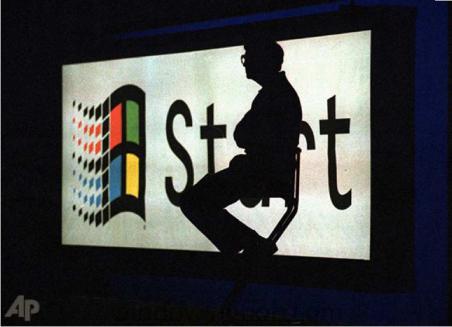
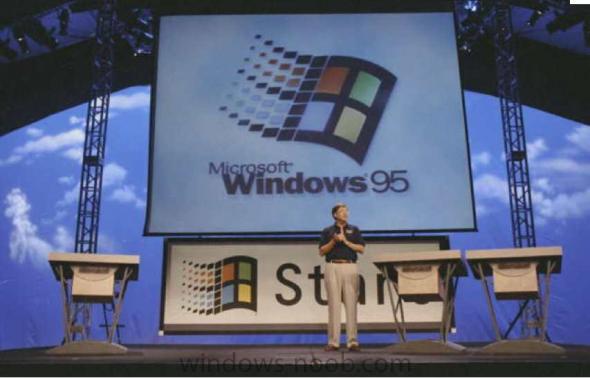
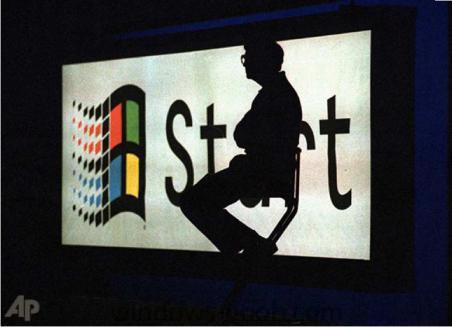
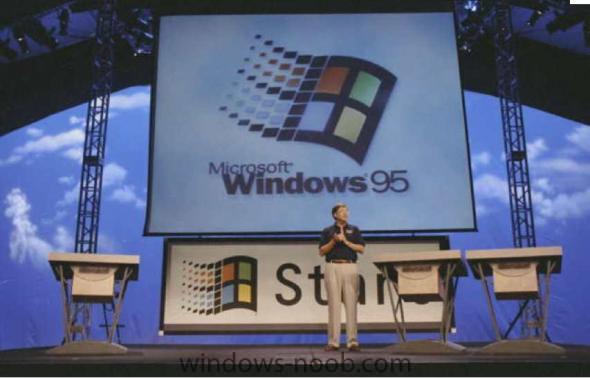
Windows 95 launched 15 years ago today, Mary Jo Foley reminds us. Today, after 15 years of additional technology evolution--and after memories of the event have been obliterated by semi-annual blockbuster launches of Apple products--it's hard to believe that the Windows 95 launch was a big deal. But it WAS. In fact, it was a monstrous deal. Windows 95 catapulted Microsoft into the mainstream consumer consciousness, in a way that no other Microsoft product ever had. It capped Microsoft's utter demolition of Apple in the first round of the companies three-decade-long war (Apple's shaping up to win the next round). It set up Microsoft for five years of awesome financial performance that nearly made the company the most valuable in the world. It also featured a MASSIVE publicity campaign, headlined by the Rolling Stones' "Start Me Up." And it featured a launch event that rocked the world. Remember? We do. The stage, the man. In those days, Bill Gates was arguably an even more awe-inspiring figure than Steve Jobs is today more > http://www.businessinsider.com/15-years-ago-today-windows-95-launched-2010-8
-
you should be using the KMS key only on the server, are you doing that ?
-
deploy office 2010
anyweb replied to sccm_freak's question in Deploy software, applications and drivers
have you tried following this guide ? - http://www.windows-noob.com/forums/index.php?/topic/968-how-can-i-deploy-office-2007-with-sccm/ -
As Microsoft approaches its fall Windows Phone 7 launch, its evangelists are working overtime to try to build momentum for the platform. Microsoft officials are announcing on August 23 that there have been 300,000-plus downloads of the beta of the Windows Phone 7 developer tools to date. They said the final version of the tools will be out September 16, but stressed that those interested in writing games and applications using the XNA Framework and Silverlight don’t need to wait for the final. “Of course, the final tools will have some minor breaking changes from the Beta tools, so developers may have to fix some bugs which arise,” acknowledged Brandon Watson, a Director in Microsoft’s Mobile Communications Business, in a new post to the Windows Phone Developer blog. “The final tools will also include several highly requested Silverlight controls which will make it even easier for developers to deliver high quality Windows Phone 7 experiences. Also in the September 16th final release, the panorama, pivot and Bing maps controls will all be available to drop into applications,” Watson added. The latest version of the Windows Phone 7 Developer Tools beta, released in July, included test builds of Visual Studio 2010 Express for Windows Phone, Windows Phone Emulator, Silverlight for Windows Phone, Expression Blend for Windows Phone and XNA Game Studio 4.0 Watson, for those who haven’t bumped into him at various Microsoft shows and events, is the guy who heads up Windows Phone developer marketing and field and sales readiness for developer engagements. He formerly worked on the technical marketing team for Server and Tools, focusing on developer platforms for Windows Azure and .Net. (He’s also founded a company that developed online-safety solutions for kids, and was a principal with Soros Private Equity Partners, in between his stints at Microsoft.) “There are half a million Silverlight developers out there, and two million C# programmers,” Watson told me during a meeting I had with him recently at a Microsoft event. “The message is write once, optimize anywhere.” He stressed that Windows Phone 7 and its ecosystem is “built by developers, for developers.” “We’re listening to developers about what they want and are being very open and transparent about what we’re delivering” in terms of tools, Marketplace policies and more, Watson said. With Microsoft, “you get discovered, you get rewarded,” he quipped. Another of those who is part of Microsoft’s Windows Phone 7 evangelism efforts is Anand Iyer, who has been working as a Microsoft evangelist in the not-usually-Microsoft-friendly Northern California area. Iyer has worked with Microsoft’s Emerging Business Team and was a program manager for the Microsoft BizSpark program for startups. Currently, he is a Senior Product Manager focusing on Windows Phone 7’s Application Developer experiences, targeting startups, students and hobbyist/indie developers in particular. Iyer said there’s a big focus with Windows Phone 7 on “long-tail developers,” not just the big names. “We want to create rockstars,” he said, to make sure that there will be some unique applications that are available only on Windows Phone 7. “The goal is to help developers truly understand what they need to do to be successful,” he said. That means finding ways to attract developers who have experience writing for other smartphone platforms, like the iPhone and Android, but also looking for those who are familiar with Microsoft’s tools and development models who may not necessarily have mobile-development experience. Microsoft recently announced 50 gaming titles that will be available on Windows Phone 7 at launch. The company also has been distributing Windows Phone 7 prototype phones to a small, selected pool of developers to help them finalize their offerings for launch. Microsoft execs have been sporting early prototype Windows Phone 7 devices at various conferences. And the team has been encouraging Microsoft employees to try their hand at developing Windows Phone 7 applications. As many pundits, developers, competitors and potential customers have noted, Microsoft has a long road ahead of it on the smartphone front. Is there anything Microsoft isn’t doing — or should rethink — that you feel would give Windows Phone 7 a better chance of success? via > http://www.zdnet.com/blog/microsoft/microsoft-touts-300000-windows-phone-7-dev-tool-downloads/7189?tag=mantle_skin;content
-
Details emerge on new DLL load hijacking Windows attack vector
anyweb posted a topic in Windows News
Metasploit’s HD Moore has released technical details on a severe application DLL load hijacking problem that haunts more than 40 Windows software programs. Moore (above), who stumbled on the issue while researching the recent LNK zero-day flaw, has released an audit kit that can be used to identify affected applications on a particular system. Moore said in a blog post. follow Ryan Naraine on twitterEssentially, if you open a file type associated with [a vulnerable app] from a remote network share, the application will also try to load one more DLLs from the share, Moore explained. Even if the file that the user opened is completely safe, a malicious DLL can be supplied that will lead to code execution. Interestingly, a variant of this problem has been known for a very long time and had been discussed publicly by academic researchers [.pdf] and hackers Thierry Zoller and Aviv Raff. Moore has been in touch with Microsoft to discuss his findings and the company said it will offer some public information and guidance about the vulnerability later today. [sEE: HD Moore: Critical bug in 40 different Windows apps ] Here are some quick facts about this class of vulnerabilities: 1. To exploit this vulnerability, an attacker must convince their victim to open a file from a directory they control. This can be an extracted archive, a USB key, or a network share using SMB or WebDAV. The file the user opens is not malicious nor does it have to have specific content to trigger the vulnerability. The audit kit uses a local directory to test for the issue and the generated proof-of-concept files can load from a local or remote directory. 2. In most cases, the user must first browse to the directory, then double-click the specific file for this exploit to trigger. Embedding this link into an OLE document or direct linking to the UNC path of the affected file type will not change the working directory to the share prior to opening it. For example, a link to \\server\documents would lead to code execution if the user opened a file from this directory, but a direct link to \\server\documents\somedocument.ext would not trigger this issue. There are some exceptions, but these tend to be application-specific problems and the general rule still applies. 3. In the case of a network share, a DLL does not be visible within the directory listing for this to be exploitable. The Metasploit module will list the affected file type but the DLL itself is not shown, since it is generated on the fly when requested by the vulnerable application. This can lead the user to believe that a safe document type in an otherwise empty network share is safe to open. 4. If the application is trying to load a DLL that is normally found within the PATH, but not the Windows system directories, and the PATH contains environment variables that have not been set, then the literal value of the environment variable be treated as sub-directory of the working directory (the share). For example, if %unknownvariable%\bin is in the system PATH, the share will be searched for a directory called “%unknownvariable%\bin” and the target DLL will be loaded from within this sub-directory. 5. Detecting a vulnerable application requires more validation than just watching for an attempt to access a DLL in the current directory. Many applications will call rundll32 to load the DLL in question and this will result in a file access in the working directory, even though the DLL may not actually be loaded. Some applications load executables and configuration files from the current directory, so any audit needs to account for non-DLL file access as well. This isn’t a problem that can simply be fixed with a security update from Microsoft. According to Moore, every affected vendor will need to release a product update to completely patch this issue. However, he offers some temporary workarounds that can help to blocking attacks: * Block outbound SMB at the perimeter. Every organization should be doing this already, as this also prevents SMB Relay attacks and NTLM hash harvesting. * Block outbound WebDAV at the perimeter. This is tricky to do unless you force your users to go through a HTTP proxy. Blocking the PROPFIND HTTP method should be enough to prevent this exploit and ones similar to it from working. * Disable the “Web Client” server on all of your desktops through group policy. This is a prudent decision for most enterprises and removes the need to put a PROPFIND filter in place for outbound WebDAV traffic. via > http://www.zdnet.com/blog/security/details-emerge-on-new-dll-load-hijacking-windows-attack-vector/7204?tag=mantle_skin;content
-
hi Johan i meant check what it is set to in your Task Sequence, Apply Windows Settings step, i'm not using cs.ini to configure it so cannot comment
-
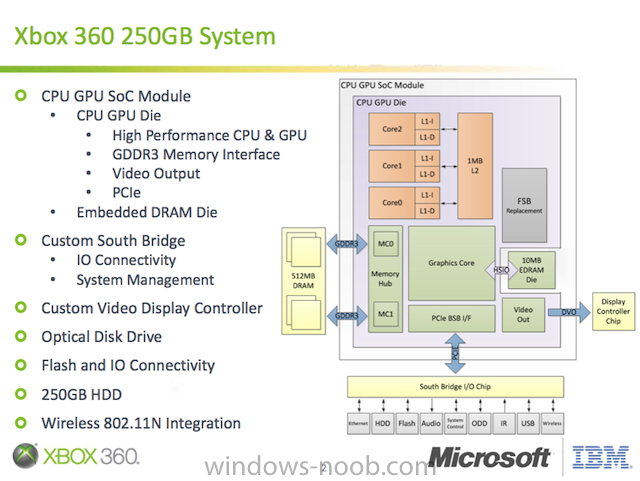
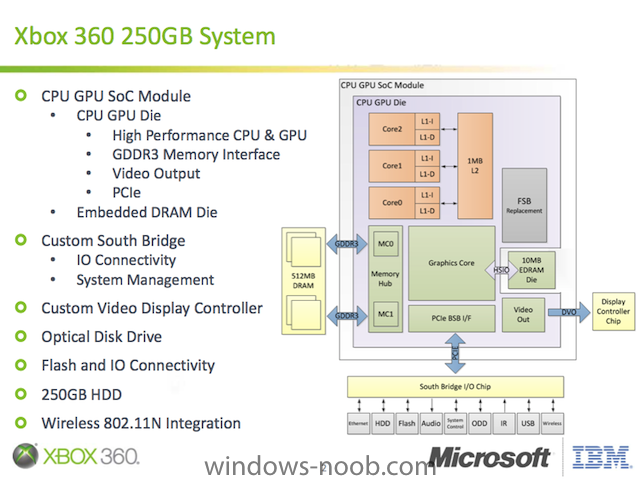
At Hot Chips today, Microsoft's Xbox team unveiled details of the system-on-a-chip (SoC) that powers the newer, slimmer Xbox 360 250GB model. Produced on the IBM/GlobalFoundries 45nm process, it's fair to say that the new SoC (pictured above) is the first mass-market, desktop-class processor to combine a CPU, GPU, memory, and I/O logic onto a single piece of silicon. The goal of the consolidation was, of course, to lower the cost of making the console by reducing the number of different chips needed for the system, shrinking the motherboard, and reducing the number of expensive fans and heatsinks. The SoC also makes the new Xbox design more power efficient, which is nice for consumers, but the real motivation behind boosting the console's efficiency is to reduce the size and cost of the power supply unit, and to realize the aforementioned savings on cooling apparatus. Microsoft engineers presented the new SoC and apparently did a lot of the layout (or perhaps all of it) themselves. Given the unique requirement of consoles—the system must perform exactly like the original Xbox 360—and despite a five-year gap and multiple iterations of Moore's Law, the consolidation presented a few interesting challenges. If you take a look at the block diagram above, you'll notice that most of the blocks are fairly obvious: the triple-core CPU is there, as is the ATI-designed GPU, and then you have the dual-channel memory controller and I/O. But the purpose of the "FSB replacement block" may not be obvious. This particular block essentially implements a kind of on-die "frontside bus" with the exact same latency and bandwidth characteristics as the older bus that connected the CPU and GPU when they were discrete parts. It would have been easier and more natural to just connect the CPU and GPU with a high-bandwidth, low-latency internal connection, but that would have made the new SoC faster in some respects than the older systems, and that's not allowed. So they had to introduce this separate module onto the chip that could actually add latency between the CPU and GPU blocks, and generally behave like an off-die FSB. Compared the discrete, 90nm CPU/GPU combo in the original 360 from 2005, the new 45nm SoC draws over 60 percent less power and reduces the total silicon area by over 50 percent. The power and die area savings mean that Microsoft can do with a single fan and heatsink what previously required multiple heatsinks and fans. The new SoC has only 372 million transistors, which is just not very many by today's standards. For reference, the old 65nm Pentium D 900 from 2006 has almost the exact same number (376 million), while the upcoming 45nm Core i5-760 has almost double the transistor count (774 million). So, despite the fact that the new SoC contains all the silicon brains of an Xbox 360, it's still very svelte by modern standards. One thing that probably was not a factor in the new design is the infamous "Red Ring of Death" that afflicted earlier iterations of Microsoft's console. That problem has been solved for a while now, so the new SoC approach was really about making the console smaller, cheaper, cooler, and quieter. via > http://arstechnica.com/gaming/news/2010/08/microsoft-beats-intel-amd-to-market-with-cpugpu-combo-chip.ars?utm_source=rss&utm_medium=rss&utm_campaign=rss
-
hi, can you post the smsts.log file please ? the incorrect function error could be due to trying to execute the script while in windows instead of doing it in winpe...
-
they will be in a state called: Initial grace Period This occurs after the computer is installed and can only last for up to 30 days, this can be reset twice. until the magical number 25 is reached or until their Activation Grace Period is reached, to find out when that date is do this: slmgr -xpr That will Display the date when the current KMS based activation will expire you'll find lots of info about KMS and MAK key's here http://technet.microsoft.com/en-us/library/dd981009.aspx
-
How to create a Driver Package
anyweb replied to emmathews83's question in Deploy software, applications and drivers
give it a try, Greg's advice is great -
leave the windows 7 machines with a blank key until all 25 machines are reporting in, that's 25 including the windows server 2008 machines so should be easy to do, do you think this will be a problem for you ?
-
expedite deployment
anyweb replied to sccm_freak's question in Deploy software, applications and drivers
start with these Client Log Files * CAS - Content Access Service. Maintains the local package cache. * Ccmexec.log - Records activities of the client and the SMS Agent Host service. * CertificateMaintenance.log - Maintains certificates for Active Directory directory service and management points. * ClientIDManagerStartup.log - Creates and maintains the client GUID. * ClientLocation.log - Site assignment tasks. * ContentTransferManager.log - Schedules the Background Intelligent Transfer Service (BITS) or the Server Message Block (SMB) to download or to access SMS packages. * DataTransferService.log - Records all BITS communication for policy or package access. * Execmgr.log - Records advertisements that run. * FileBITS.log - Records all SMB package access tasks. * Fsinvprovider.log (renamed to FileSystemFile.log in all SMS 2003 Service Packs) - Windows Management Instrumentation (WMI) provider for software inventory and file collection. * InventoryAgent.log - Creates discovery data records (DDRs) and hardware and software inventory records. * LocationServices.log - Finds management points and distribution points. * Mifprovider.log - The WMI provider for .MIF files. * Mtrmgr.log - Monitors all software metering processes. * PolicyAgent.log - Requests policies by using the Data Transfer service. * PolicyAgentProvider.log - Records policy changes. * PolicyEvaluator.log - Records new policy settings. * Remctrl.log - Logs when the remote control component (WUSER32) starts. * Scheduler.log - Records schedule tasks for all client operations. * Smscliui.log - Records usage of the Systems Management tool in Control Panel. * StatusAgent.log - Logs status messages that are created by the client components. * SWMTRReportGen.log - Generates a usage data report that is collected by the metering agent. (This data is logged in Mtrmgr.log.) -
expedite deployment
anyweb replied to sccm_freak's question in Deploy software, applications and drivers
as Marcus says, plus you should be patient when it comes to ConfigMgr, patience is a requirement (as you'll learn) -
Metasploit’s HD Moore was in the midst of researching the recently patched LNK (Windows shortcut) vulnerability when he stumbled upon a serious problem that exposes more than 40 different Windows software programs to remote code execution attacks. Moore issued a brief warning about the issue via Twitter and linked to a critical bulletin from Acros, a Slovenian security research outfit, that references a remote code execution bug patched in Apple’s latest iTunes update. From Acros: A “binary planting” vulnerability in Apple iTunes for Windows allows local or remote (even Internet-based) attackers to deploy and execute malicious code on Windows machines in the context of logged-on users. [ As attacks escalate, Microsoft ships emergency Windows patch ] According to the advisory, all a remote attacker has to do is plant a malicious DLL with a specific name on a network share and get the user to open a media file from this network location in iTunes - which should require minimal social engineering. Since Windows systems by default have the Web Client service running - which makes remote network shares accessible via WebDAV -, the malicious DLL can also be deployed from an Internet-based network share as long as the intermediate firewalls allow outbound HTTP traffic to the Internet. A systematic attack could deploy malicious code to a large number of Windows workstations in a short period of time, possibly as an Internet worm. “I ran across it working on the shortcut bug and about fell out of my chair,” Moore said in an interview. “It made the LNK exploit almost pointless.” That LNK exploit, patched via an emergency out-of-band patch by Microsoft, was discovered as part of a sophisticated malware attack that combined the Windows zero-day flaw with security problems in SCADA systems and used stolen signed drivers to bypass security software. Moore declined to provide details of the new security problem until he got a chance to brief Microsoft’s security response team on his findings. “Anyone who worked on the shortcut exploit will know exactly what the issue is by now. A bunch of people know about it,” he said. “The bug is bad behavior on the part of certain Windows applications when loading files from a network share,” Moore added. He declined to identify the 40 Windows applications that are vulnerable until after his discussions with Microsoft. “It’s a wide range of things that are vulnerable, some open-source as well as commercial.” According to Computerworld’s Gregg Keizer, each affected application will have to be patched separately. “The vector is slightly different between applications, but the end result is an attacker-supplied .dll being loaded after the user opens a ’safe’ file type from a network share [either on the local network or the Internet],” Moore said in an e-mail reply to questions. “It is possible to force a user to open a file from the share, either through their Web browser or by abusing other applications, for example, Office documents with embedded content.” Moore is expected to go public with more details next Monday. via > http://www.zdnet.com/blog/security/hd-moore-critical-bug-in-40-different-windows-apps/7188?tag=content;search-results-river