



anyweb
-
Posts
9292 -
Joined
-
Last visited
-
Days Won
371
Everything posted by anyweb
-
well take a look at the webcasts here, specifically the PXE boot parts, you'll see that they are quite slow, but then again they are running on virtual machines (hyperv) and on Windows Server 2008, where I'm working currently is using Windows Server 2003 and the PXE process is slow, I am assuming that is down to slow network/slow backend hardware (virtual servers) and possibly QOS throttling on the network
-

Deploying Software Updates in PXE Task Sequence
anyweb replied to DizzleSizzle's question in How do I ?
yes its possible, in the task sequence properties screen, check Environment and set the program to run on an OS that you DO NOT HAVE in your organisation, for example Windows Vista X64 or Windows 2000, now when you are in Windows, the client will not show the task sequence in Run Advertised Programs (it will remain hidden) but they can PXE boot at any time and access the Task Sequence -
sounds about right to be honest, however have you tried varying your nic speed from gigabit to different duplex settings ? is there a switch between you and the clients ?
-
The file or directory is corrupted and unreadable. (Error: 80070570; Source: Windows) <-- is interesting, what boot media are you using ? tell me how you created it and have you tried to create something else ? what hardware are you trying to deploy to exactly ?
-
within the ts itself, please test it and you'll see what i mean, it's a free tool, just fire up winpe, and execute it from the command prompt
-
Deploying Software Updates in PXE Task Sequence
anyweb replied to DizzleSizzle's question in How do I ?
you can script it to add the computer to a collection, it's part of the SDK look here -
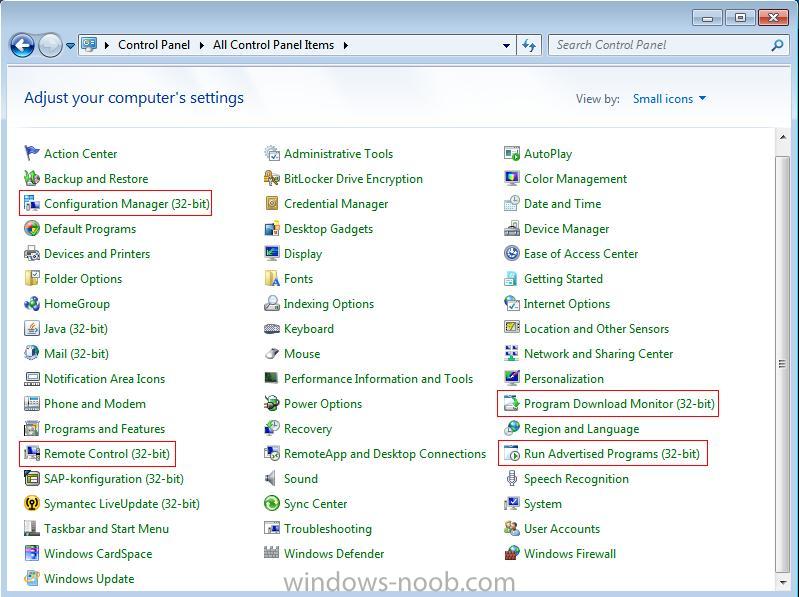
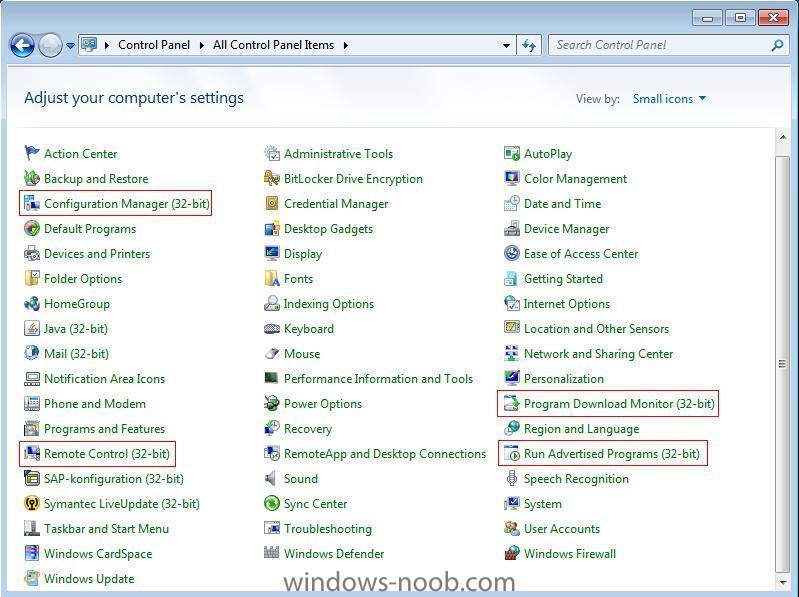
they are 32 bit apps, here is what you should see when the view is set to small icons
-
you could try using the tsenv2 tool from 1e, you can use that to set variables including the site code you are mentioning
-
so this is software updates for windows xp or what ? have you tried having more than one Install Software Updates task in the ts with a reboot inbetween ?
-
Deploying Software Updates in PXE Task Sequence
anyweb replied to DizzleSizzle's question in How do I ?
remember this much, software updates will only deploy when a computer is in a collection that the Deployment Management Task is pointing to during the Operating System Deployment, so where is your computer during the deployment, what collection ? -
yup, look at the updating section of the SCCM guides here
-
yes it has to be SP2
-
try here and no i don't think it will help you with your restore problem, i'd break up your usmt testing first of all in to two collections, state capture and state restore then create two simple task sequences, one for state capture, one for state restore, you can cut/paste the needed bits from a standard Install task sequence (if you want the features of USMT 4 then thats another story...) once you have state capture working (and you'll know from reading the scanstate.log and scanstateprogress.log files) you can then start testing state resore, what does your loadstate.log file say ?
-
How can i get Forum Password..Can any one help me?
anyweb replied to kiran's question in Troubleshooting SCOM
closed for now, sorry -
good point, i'd recommend starting with Firefox as a test, if you can install that (and it's very easy) then you are on the right track
-
the bootable option just replaces the PXE boot and not a whole lot more, meaning you use it in areas where you cannot use PXE the standalone option puts everything on your usb key/cd/dvd which is cool and can be faster when it comes to deployments covering usmt4/large wims/large apps/etc
-
yup, in the OSD section, expand task sequences, select your deploy 7 task sequence, right click on it, choose Create Task Sequence Media, the first option is probably best for you, (Standalone) you can create bootable USB keys, or CD/DVD's cheers niall
-
we are very excited to announce the release of Beta 1 for System Center Configuration Manager v.Next. System Center Configuration Manager v.Next is uniquely positioned to provide for powerful and flexible user-centric client management, allowing users to be able to seamlessly access their data from virtually anywhere, across multiple device types while providing IT with unified management tools and centralized control. This next release of Configuration Manager is focused on 3 main pillars: User centric application management - Empowering Administrators to define intent, and end users flexible access to the right application at the right time * Allow the administrator to think users first * Application management model to capture admin intent * End user self-service software portal Infrastructure simplification – Simplify management infrastructure, processes and administrative overhead * Unified management across PCs and devices * New role based administration and end-user experiences * Automated content distribution and troubleshooting * Redesigned core infrastructure and improved scalability Simplify Client Management – Daily tasks, model based configuration management and improvements over existing capabilities * Automated compliance remediation * Client health and auto remediation * Remote control enhancements * Offline servicing of OS images Over the coming weeks, there will be a wealth of content for you to experience. From online labs, to virtual machines, review material, interviews and demonstrations. For now, join the beta, join the conversation, and learn about the next generation of client management. http://blogs.technet.com/b/systemcenter/archive/2010/05/24/the-next-generation-of-client-management.aspx

-
good work, did you do that guide ?
-
Network access account trouble during SCCM OSD
anyweb replied to asim's question in Troubleshooting, Tools, Hints and Tips
Content location request for SHC00053:2 failed. make sure that package is updated on the distribution points, verify it is from the package status, and then try again -
hi Eric if you look at the list of SCCM Guides here you'll see there's a troubleshooting section which covers your error, which is abortpxe.com, so try the suggestion there and let us know does it help
-
as the others advised on Technet and Myitforum.com have you tried gpo's ? if not any reason why not ?
-
try build and capture using the Windows 7 Enterprise DVD instead of using an OEM dvd (which i assume you are doing), also i moved your post to the windows 7 section
-
great i look forward to it., post screenshots too !
-
hi Bob are you sure you added the right drivers to both boot images, and then updated the boot images to their dp's ?