



anyweb
-
Posts
9280 -
Joined
-
Last visited
-
Days Won
371
Everything posted by anyweb
-
you'll have to select your package, right click and choose Manage Distribution Points then remove the MP you don't want to use and select the one you do want to use cheers anyweb
-
this could be related to your dhcp server, your WDS server setup or DNS issues, so to try them all do a DNS lookup test, type nslookup and verify the results are ok for wdsserver you must have the wdsserver 'service' listed in one of the share permissions, check the remoteinstall share on your server and verify the permissions on that share, if you do not see WDSServer listed then you'll have to uninstall wds servvice, reboot, delete remoteinstall folder, and finally reinstall wds service where is your dhcp server located, on the SCCM server or on another box..... if on another box you may need to configure option 66, 67 or using IP helpers, i've seen your problem before so we will solve it, cheers anyweb
-
i'm in central europe (sweden) so GMT +1 hour, i should be around tomorrow night which will be during your office day, so try contacting me on msn then, if i\'m around i'll reply
-

how can I deploy Windows Server 2008 using SCCM 2007 - 3 Part Guide
anyweb replied to anyweb's question in Deploy Server 2008
good luck, and read my windows SIM posts to get a better overview of how it all works.. it's a confusing area to say the least -
client push install with Non-Default IIS port
anyweb replied to High Tower's topic in Configuration Manager 2007
the port is defined when you install SCCM as in this screenshot if you want to change it, then go into site settings and right click, choose properties, then ports as below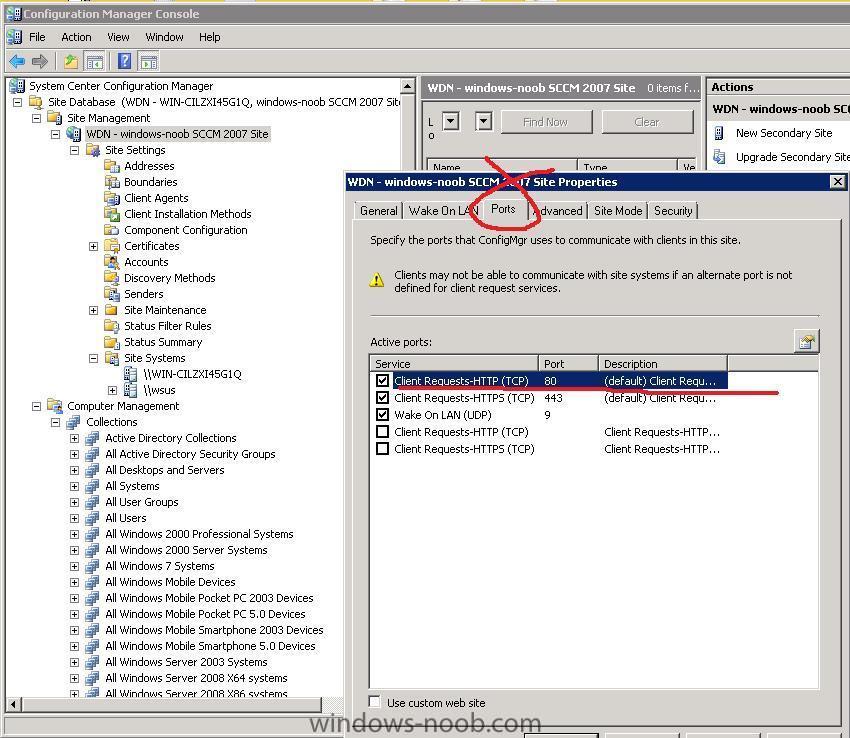
-
hi all the site will change look and feel very very soon, to get an idea of what it will look like then please browse it's sister site linux-noob.com cheers anyweb
- 1 reply
-
- 1
-

-
client push install with Non-Default IIS port
anyweb replied to High Tower's topic in Configuration Manager 2007
where on your sccm server did you define it for port 200 ? -
client push install with Non-Default IIS port
anyweb replied to High Tower's topic in Configuration Manager 2007
i need more info about your setup, server os etc -
Package Advertisements
anyweb replied to thepede's question in Deploy software, applications and drivers
in your site settings, client agents, what is your Policy Polling Interval (minutes) set to ? it's listed under Computer Client Agent -
Package Advertisements
anyweb replied to thepede's question in Deploy software, applications and drivers
and if you manually do the action i just said on the client, how long does it take ? -
how can I deploy Windows Server 2008 using SCCM 2007 - 3 Part Guide
anyweb replied to anyweb's question in Deploy Server 2008
where did you create the cd ? I assume that you created it on the other primary server or within that boundary, or not ? -
Package Advertisements
anyweb replied to thepede's question in Deploy software, applications and drivers
if you initiate a Machine Policy Retrieval and Evaluation Cycle, then it should speed up the process considerably, how long is it taking from you creating an advertisement to a client seeing it ? -
whatever you can see in unattend.xml or sysprep.inf should be able to be substituted as a collection variable as long as you do a Gather (ztigather) beforehand and Configure (zticonfigure) afterwards both scripts are part of the Microsoft Deployment Toolkit and already present in a standard MDT task sequence start your testing by doing TimeZone first, then when you have it working, expand by adding one more variable at a time, here are the values for timezone by the way (scroll down) http://technet.microsoft.com/en-us/library/cc772783.aspx cheers anyweb
-
Deployment of software not working?
anyweb replied to deconinckg's question in Deploy software, applications and drivers
on the client side verify (for testing) that the firewall is off. on the client side do an nslookup test to verify that there are NO dns issues on the server side verify in ConfigMgr all systems collection that the client you are trying to push software to is listed as Client=Yes and Approved=Yes cheers anyweb -
i'm available on msn messenger and gmail, just add me and we'll talk about it, i think it's the quickest way forward for you anyweb AT ....hotmail.com
-
take a look at this post, but it looks like you are going about things the wrong way http://isatechie.blogspot.com/2009/05/how-...site-child.html did you format the server completely ?
-
try adding your settings to Collection Variables instead, much easier to manage, for example create a collection variable called TimeZone and give it a value of 110 then do a deployment and watch what the timezone ends up being set to cheers anyweb
-
hi, do you have any computer that is connected to the router that i can remotely connect to ?
-
if i was you and I had the problems you now have, I would start from scratch and build a new SCCM server and rebuild the packages, collections and push out the client software to the clients, it will take time but then you will be totally in control of it all, right now you are in control of a mess that doesn't work if you decide to reinstall using the same site code then take a look at this
-
The geek world might be all over Windows 7, and the rest of the world might be sticking to Windows XP for now, but there is also this Windows Vista operating system lingering around. Microsoft has just released the final version of the second service pack for Windows Vista and Windows Server 2008. Fixes > http://technet.microsoft.com/en-us/library...036(WS.10).aspx For Windows Server 2008 customers, there's also a list of improvements. Hyper-V will now be a part of Windows Server 2008, instead of it being a separate download, turning it into a "fully integrated feature", " including one free instance with Windows Server 2008 Standard, four free instances with Windows Server 2008 Enterprise and an unlimited number of free instances with Windows Server 2008 Datacenter." Other changes include improvements in WebDAV, power management, and more. The service pack comes in a single package which will work on both Windows Vista and Server 2008. There's a 32bit version and a 64bit version. Note that SP1 is a pre-requisite before installing SP2 (SP1 came integrated on Server 2008). In addition, people who used vLite to alter their base Windows installation may not be able to install Service Pack 2 because required components may have been removed. There's a "workaround": happy re-installing. via > http://www.osnews.com/story/21559/Windows_...08_SP2_Released
-
Product Key Problems
anyweb replied to theozmanbo's question in Deploying Windows 10, Windows 8.1, Windows 7 and more...
yeah my dell oem vista installs just fine on Dells and they are activated straight away, no need to even enter a key, so are you deploying on Dell's which came out AFTER vista shipped or before ? -
i have the same problem with Virtual Server 2005 r2sp1 on my home lab server (Windows 2008 ent), but its only for the pxe boot section, everything else is fine so i live with it, i don't have any virtual extensions in my CPU so I'm not using hyperv .... could be that, or could be something else, so i hope we find out why, this only applies to my VIRTUAL clients, if I boot a real computer to the same server it PXE boots just fine do you have any virtual support in your CPU ?
-
Deploy XP SP3 Network Installation with SCCM SP1
anyweb replied to High Tower's question in Deploy XP
hi Service Pack 3 is not an OS therefore you cannot deploy it as an operating system, you need to deploy it as a standard application so you'll need to first create a Package for SP3, then create a Program, the Program should point to the EXE file and should contain the Switches required to install the service pack, for example WindowsXP-KB936929-SP3-x86-ENU /quiet /forcerestart /forceappsclose /d:c:\temp\sp3 /log:c:\temp\sp3\xpsp3.log then advertise the package to a test group of XP computers, good luck -
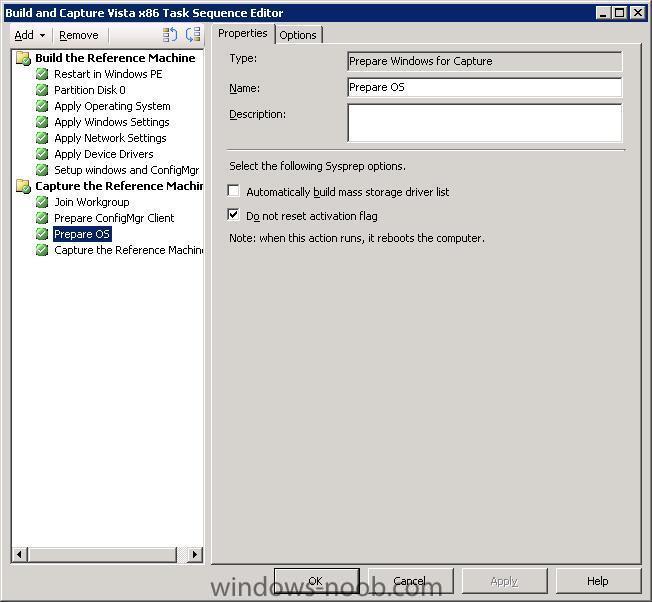
from your log above which sounds like you have booted the system using windows PE instead of running this part of the task sequence within windows...
-
be the first to post about it here, try and see how far you get